
Are you preparing for a flight and looking for a quick way to identify your luggage before departure? A printed luggage tag made at home, on a simple sheet, is a great replacement for the cardboard models distributed at the airport. The principle is straightforward: a fillable PDF file, a printer, and your cabin or checked baggage carries your contact information in just a few minutes.
Paper luggage tag or rigid tag: what really fits on a piece of luggage
The tags sold in travel stores are often made of PVC or silicone with a transparent window. They withstand rain and the friction of the conveyor belt well. A printed paper tag does not offer the same durability, but it has an advantage that travelers often underestimate: it can be replaced for free with each trip.
A printed PDF model on sufficiently thick paper (like cardstock for home printers) holds up well for a round trip. For a longer stay or a transit with a layover, it’s better to slip it into a plastic sleeve or cover it with wide transparent tape.
You can also prepare a printable luggage tag PDF tailored to the dimensions of your luggage, whether it’s a compact cabin bag or a rigid checked suitcase. The PDF format preserves the layout regardless of the operating system or printer used.
Information to include on a cabin and checked baggage tag
Have you noticed that some tags only have a name and a phone number? This is often insufficient in case of loss, especially for checked baggage that passes through multiple airports.
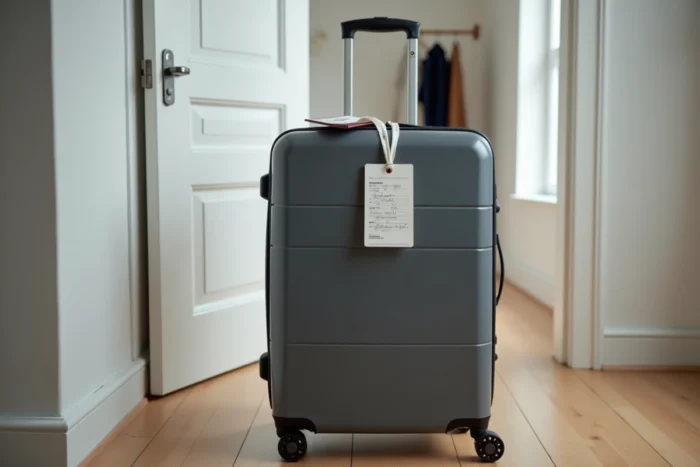
Here is the information to include on your tag, whether for a flight or a trip on a TGV INOUI:
- Traveler’s first and last name, written legibly (avoid fancy fonts if filling out the PDF on a computer)
- Mobile phone number with the international dialing code, for example +33 for France
- Email address rather than the full postal address, to limit visible personal data
- Flight or train number and departure date, useful for staff sorting lost luggage
Prefer the email address to the full postal address. A tag visible to everyone on a recovery belt exposes your contact information. The email is sufficient for the baggage service to contact you.
The case of train travel with SNCF
On a TGV or Intercités, there is no formal obligation to label your luggage. The tag is still useful for distinguishing your black suitcase from dozens of others in the luggage rack. Add your train number and departure station: in case of forgetting on board, SNCF staff can find you more quickly.
PDF format and dimensions: adapting the tag to your printer
A luggage tag PDF file typically appears on an A4 page, with several cuttable tags. The most common format places two to four tags per sheet, each the size of a business card or slightly larger.
Why use PDF instead of a JPEG or PNG image? The PDF maintains fixed proportions when printed. With an image file, the printer may resize the document according to its default settings, which distorts the text or reduces the font size to the point of making it unreadable.
Print settings to check before departure
Before starting the print, check two settings in your printer options:
- The scale should be set to “actual size” or “100%”, not “fit to page,” to maintain the intended dimensions
- The selected paper type must match the weight used: cardstock requires a specific setting for the ink to dry properly
- Print a test on plain paper before using your thick paper, to check alignment and readability
If your printer is inkjet, let the sheet dry for at least one minute before cutting. Inkjet ink smudges when it comes into contact with moisture, which can make your contact information unreadable at the airport.

External tag and internal tag: double up to limit risk
Most travelers attach a single tag to the handle of their suitcase. This tag can be torn off during checked baggage handling. The straps of sorting belts and mechanical handling in check-in areas are tough on small accessories.
Slip a second tag inside your luggage, for example in the front pocket or in a compartment visible upon opening. If the external tag disappears, the airport baggage service will open the suitcase to look for identification. A printed sheet with your contact information, placed on your clothes, speeds up the return.
This reflex also applies to cabin baggage. A bag forgotten in the overhead compartment of an airplane will be inspected by the cabin crew. Without visible identification, it ends up at the airport’s lost and found, with sometimes long retrieval times.
Attaching the printed tag without damaging it
A paper tag does not attach like a rigid tag with a loop. Three methods work well depending on the type of luggage:
For a rigid suitcase with a telescopic handle, wrap the tag around the fixed side handle and secure it with a piece of wide transparent tape. The tape also protects the paper from moisture.
For a soft bag or backpack, slide the tag into the integrated tag holder if the bag has one. Otherwise, a zippered plastic pouch secured with a drawstring makes a simple and waterproof holder.
For a compact cabin bag, a simple printed sticker stuck on the surface may suffice for a round trip. Ensure that the adhesive does not leave residue on the suitcase shell.
Whatever the attachment method, test the sturdiness by shaking the luggage. If the tag falls in your hallway, it will also fall on the airport conveyor belt.